Build with AI
AI on the Cloud: Build and Deploy AI Applications
Build a small AI application and learn what it takes to run it: an authenticated API, answers grounded in supplied documents, useful logs and checks before an action is sent. The six-month course moves from Python foundations to a cloud project you can demonstrate and explain.
Why this course
From a working answer to a system you can inspect
A useful demonstration shows more than a convincing answer. Can the application identify the document it used? What happens when the answer is missing, the caller lacks access or the model service fails? Those questions connect AI behaviour with cloud engineering.
Practise with a small document set you are allowed to use and synthetic contact details. Keep expected answers and failure cases beside the project so a reviewer can repeat the checks. A citation is a pointer to evidence, not proof that every sentence is correct.
Treat the project as a learning system. Production use needs a separate review of the intended users, data permissions, operating costs and support responsibilities. Course completion does not make a demo ready for every business use.
Published by Simply2Cloud Team · Course guide updated 8 November 2026
- Python from the basics needed for AI work.
- Calling AI models through APIs, and prompt design that holds up in code.
- Answers grounded in your own documents (retrieval), with sources shown.
- Serverless deployment on AWS, with an Azure comparison.
- Practice with access control, logging, usage controls and human approval.
Graduates and developers who want to build AI features, and cloud learners who want to add AI deployment to their skills.
Basic computer use and time to practise between classes. Python is taught from the start. Ask about laptop requirements, the lab accounts supplied, software access and any separate cloud or model charges before enrolling.
There is no single industry exam for this course. Learners who want a credential can follow with AWS or Azure AI certifications; exam fees are separate.
AI application developer (junior) · Cloud engineer with AI deployment skills · Automation engineer
How the course runs
The plan, in the order we teach it.
- Months 1–2
Python for AI work: data types, functions, files, JSON, calling web APIs. AI fundamentals and how language models behave.
- Months 3–4
Working with AI model APIs, prompt design, structured outputs, retrieval from your own documents and testing answers.
- Months 5–6
Deploying on AWS (API Gateway, Lambda, storage, secrets, logs), cost limits and monitoring, an Azure comparison, then the final project.
Your project
A support assistant that cites its sources
Build a support-assistant API over an authorised sample document set. Aim to show the source of an answer, give a clear fallback when evidence is missing and hold outgoing actions for approval. Use tests to establish what the demo actually does; do not assume that retrieval makes every response correct.
From course project to real projectsWhat you hand in
- An authenticated API and a diagram showing documents, retrieval, model access and the approval step
- A repeatable test set: supported questions, missing answers, an unauthorised caller and instructions hidden in a sample document
- A failure record showing what happened when a dependency was unavailable, with a clear recovery or stop decision
- A usage-control and cost-monitoring note: what is limited, what only raises an alert, and which resources remain billable
- A handover with setup steps, redacted example logs, known limitations and instructions to remove the lab resources
Syllabus
Curriculum designed by working engineers.
Tools covered
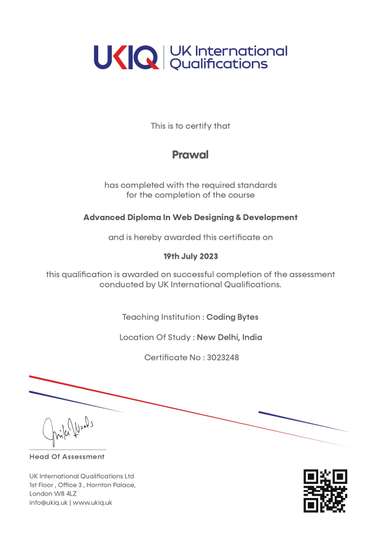
UKIQ certificate. Professional batches include a UKIQ certificate alongside the project you can show in an interview.
01Foundations
- Python for AI work
- Calling web APIs and handling JSON
- What language models can and cannot do
- AI safety and data protection basics
02Building with AI models
- Model APIs and prompt design
- Structured outputs for use in code
- Retrieval: answering from your own documents
- Testing answers and handling failure
03Deploying in the cloud
- Serverless APIs on AWS
- Secrets, access control and logging
- Cost limits and monitoring
- Azure AI services compared
- Human approval before consequential actions
FAQ
Questions before you enrol.
Do I need to know programming?
No. Python is taught in the first two months, focused on what AI applications need.
Which AI models do you use?
Current models from major providers, accessed through their APIs. Model choices are updated as the field changes; the engineering habits stay the same.
What does the fee include?
The published tuition is ₹45,000 for six months, including classes and labs, the final project and placement assistance. Confirm which lab accounts and usage allowances are supplied, what you pay separately, and who closes billable resources after the course. Do not assume that a free tier covers every exercise.
Does a budget alert stop cloud spending?
Not by itself. AWS Budgets reports and notifications can lag usage, so spending may continue before an alert arrives. Review the current AWS Budgets documentation, use appropriate application and service controls, and check for resources left running after a lab. A chosen budget figure is not a universal hard cap.
How could I demonstrate the approval step?
Use a simulated outgoing action. Show that a draft waits, that a rejection prevents the action, and that approval applies to the specific content and destination reviewed. Keep real customer messages out of the demonstration.
What should I show when the assistant gets an answer wrong?
Keep the question, expected evidence and observed answer, then explain the correction and rerun the test. Include at least one unsupported question in your walkthrough. An honest failure record is more useful than selecting only successful responses.